
Preface:
Books that look flawless digitally can still struggle physically. Every printed book needs to follow some specifications to avoid errors and get accepted on the first upload. The right book Print Format makes text readable, images sharp, and covers clean.
This guide breaks down how to format a book for printing. You’ll learn the ideal trim size, margins, resolution, spine width, and binding.
Books that look flawless digitally can still struggle physically. Before moving to physical proofs, make sure your digital layout is solid by following proper eBook formatting standards.
The Best Trim Size for Paperback
Trim size is the finished page size, and every other setting is shaped by it. First focus on fixing it, because altering it later reflows every page and changes your page count.
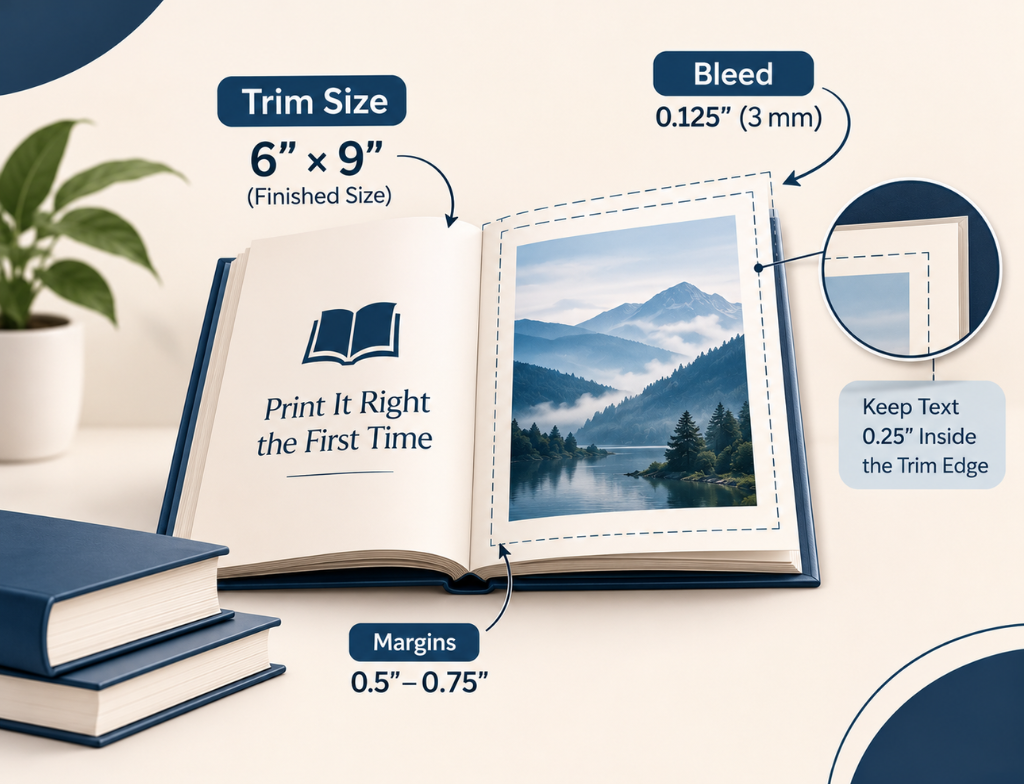
The best trim size depends on the book’s genre. For most fiction and narrative non-fiction, 5.5″ × 8.5″ suits best, whereas 6″ × 9″ is popular for non-fiction and workbooks. KDP and IngramSpark widely support both.
What Is Bleed in Printing? Understanding Book Bleed
In Print Format, the side of the pages gets cut a little. That’s why bleed is added to avoid the white edges that appear after cutting.
Ideal bleed: Book bleed on KDP is 0.125″ (3 mm) on the top, bottom,m and outside edges. So, a 6″ × 9″ (trim size) page becomes 6.125″ × 9.25″.
However, there is an exception: bleed is added to books that contain images or illustrations. Text-only interiors need no bleed. Keep text at least 0.25″ inside the trim edge, or 0.375″ (0.125″ + 0.25″) on pages with bleed so that the content doesn’t get trimmed.
Calculating the Spine Width for the Full Cover
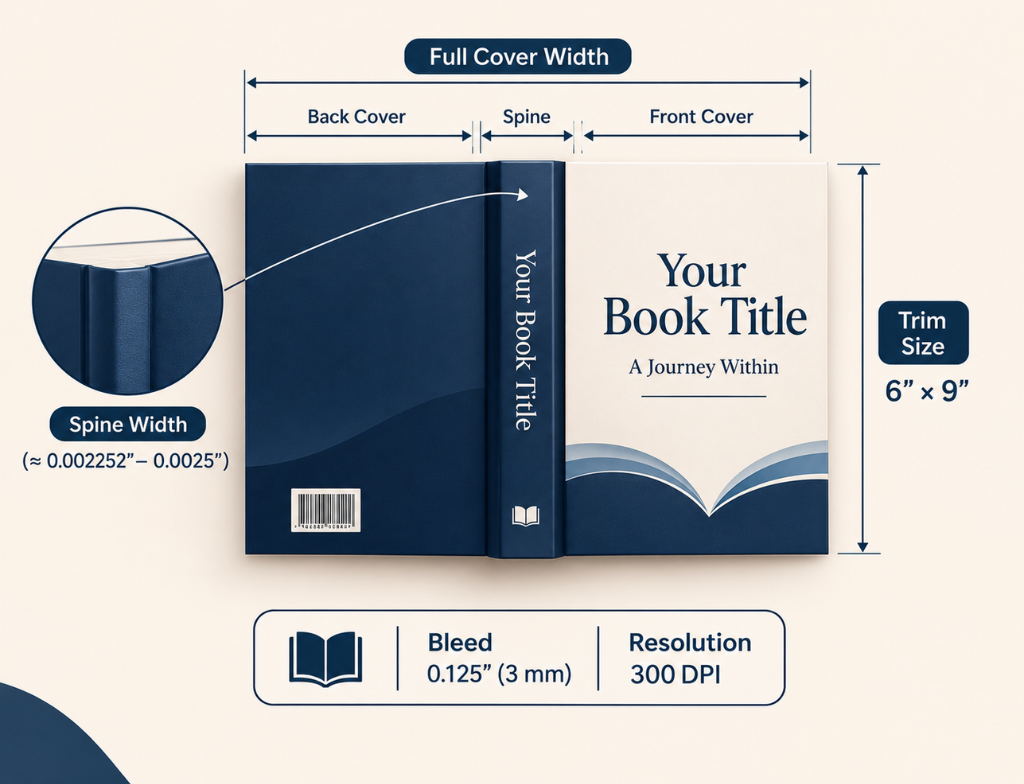
The width of the spine depends on the page count and paper type, so it differs in every book. KDP multiplies pages by paper thickness.
Ideal spine width: It makes the spine 0.002252″ for white paper and 0.0025″ for cream.
Build the full cover as one file withback spine spine, and bleed. Spine text is only allowed for books of at least 79 pages. IngramSpark and Lulu use their own templates, so always use your platform’s.
Before putting together your full wraparound file, ensure your graphics meet professional standards by checking out our guide on professional book cover design to get your dimensions and assets right on the first try.
Setting the Book Gutter Margin by Page Count
The book gutter margin is the inside margin beside the spine. Thicker books curve more at the binding, so KDP’s minimum gutter grows with page count:
| Page count | Minimum gutter |
| 24–150 | 0.375″ |
| 151–300 | 0.5″ |
| 301–500 | 0.625″ |
| 501–700 | 0.75″ |
| 701–828 | 0.875″ |
Treat these as minimums, not targets. A slightly wider gutter could help reading more comfortably.
300 DPI for Book Covers
Lower-resolution images print softly; that is why 300 DPI is relevant for book covers. A full-page-size image (6″ × 9″) with bleed requires about 1,838 × 2,775 pixels.
In addition, vivid RGB colours look dull on paper. Converting them before uploading is a safer option. Printers also use CMYK, so go with this approach.
How to Print a PDF File in Book Format
To print in booklet format, set the printer to double-sided and use a page count in multiples of four. Thick booklets may need allowance for page creep, where inner pages shift outward after folding.
To print at home, use the Booklet option in Adobe Acrobat’s print dialog, or Word’s Book fold setting under Page Setup. Both reorder pages so folded sheets read correctly.
Hardcover Book Format vs Paperback
Paperbacks use perfect binding and cost less to print. A hardcover book format uses a stiff cover, either printed directly or with a dust jacket. It also needs extra cover space for wrap and hinge allowances. KDP demands at least 75 pages for hardcovers.
Print It Right the First Time
Print errors are simple to prevent and expensive to fix. Uprisen Publishers’ Print Format service prepares interior and cover files for KDP, IngramSpark, and other printers, so your book is approved and printed correctly the first time.
Choose according to your budget and what your readers expect. Before publishing, read our guide on how to fix your KDP eBook rejection to ensure your digital files pass review effortlessly.